ARTIFICIAL INTELLIGENCE, DATA & ANALYTICS
BESPOKE DATA VISUALISATIONS
AI ADOPTION SOLUTIONS
CUSTOM SOFTWARE DEVELOPMENT
CLOUD & OPERATIONS
EMBEDDED SOFTWARE
DATA & AI ADVISORY
IOT, CLOUD, DELIVERY & ENABLEMENT
Kubernetes is powerful out of the box, but its built-in primitives (Pods, Deployments, Services) only get you so far. At some point you need Kubernetes to understand your own domain concepts, manage your own resource types, and react to changes in them automatically.
Custom Resource Definitions (CRDs) and Operators solve exactly this. They let you extend the Kubernetes API with resources that are native to your domain, with your own validation rules and your own logic for what happens when things change.
Say you have 20 microservices, each needing the same set of Kubernetes resources alongside it, a Deployment, a ConfigMap, a ServiceAccount, maybe a network policy. Without CRDs you copy and adapt the same YAML across 20 places, and every operational change (a new environment variable, a policy update) means touching all 20. With a CRD and an Operator you define the pattern once. Each microservice is described by a single validated custom resource, and the Operator provisions everything it needs, consistently and automatically.
The guide covers the full picture: the theory behind CRDs and the reconciliation loop, and a working .NET implementation using the KubeOps Operator SDK.
A quick refresher on how Kubernetes works before getting into CRDs.
Every object in Kubernetes, a Pod, a Deployment, a ConfigMap, is a resource. Each resource has a schema defined in YAML, is stored in etcd (the cluster’s key-value store), and can be interacted with via kubectl or the Kubernetes API. Kubernetes continuously watches those resources and reconciles the actual state of the cluster toward the desired state described in the YAML. You describe what you want, and the system figures out how to get there, continuously, even in the face of failures or unexpected changes.
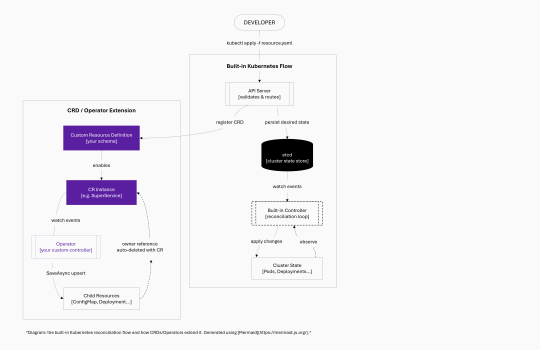
The diagram below shows the core flow and where CRDs and Operators fit into it:
On the left, the standard Kubernetes loop: a developer applies a YAML file, the API Server validates and persists it to etcd, and a built-in controller observes the change and drives the cluster toward the desired state. On the right, CRDs plug into this exact same pipeline, your custom resource lives in etcd alongside built-in resources, and your Operator acts as the controller that watches it and does the work.
Once you register a CRD with the cluster, Kubernetes treats your custom resource exactly like any built-in one:
One thing to be clear about: a CRD is just a schema. It answers “what does this resource look like?” but does not, on its own, make anything happen. That is the Operator’s job.
A CRD is written in YAML and follows the standard Kubernetes resource format, just like a Deployment or a Service. The schema uses OpenAPI v3 notation, giving you rich validation (required fields, type checking, min/max constraints, and conditional rules) enforced by the API Server before any instance of your resource is created.
Here is a complete example defining a SuperService resource under the demo.holisticon.com API group:
apiVersion: apiextensions.k8s.io/v1
kind: CustomResourceDefinition
metadata:
  name: superservices.demo.holisticon.com
spec:
  group: demo.holisticon.com
  names:
    kind: SuperService
    plural: superservices
    shortNames:
      - ssc
  scope: Namespaced
  versions:
    - name: v1alpha1
      served: true
      storage: true
      subresources:
        status: {}
      schema:
        openAPIV3Schema:
          type: object
          properties:
            spec:
              type: object
              properties:
                superDictionary:
                  type: array
                  items:
                    type: object
                    properties:
                      name:
                        type: string
                      value:
                        type: string
                    required:
                      - name
                      - value
                superNumber:
                  type: integer
                otherNumber:
                  type: integer
              required:
                - superDictionary
                - superNumber
Register it with a single command:
kubectl apply -f super-service.yaml
# customresourcedefinition.apiextensions.k8s.io/superservices.demo.holisticon.com created
Now create an instance of the new resource type:
apiVersion: demo.holisticon.com/v1alpha1
kind: SuperService
metadata:
  name: mysuperservice
  namespace: crd-demo
spec:
  superDictionary:
    - name: abc
      value: foo
    - name: def
      value: bar
  superNumber: 8
  otherNumber: 11
kubectl apply -f service-instance.yaml
# superservice.demo.holisticon.com/mysuperservice created

kubectl get ssc -n crd-demo
# NAME             AGE
# mysuperservice   3s
At this point the instance is stored in etcd and Kubernetes is watching it. But nothing else happens, there is no controller yet to act on it. The resource is a data record with a schema, nothing more. That is where Operators come in.
A CRD defines the schema. An Operator is the application that watches instances of your CRD and does the actual work. It knows what needs to happen when a SuperService is created, what to update when its configuration changes, and what to clean up when it is deleted. Where a CRD is passive, an Operator is active.
The pattern is built on the reconciliation loop: observe the current state, compare it to the desired state, take action to close the gap, repeat. Kubernetes uses this same loop internally for built-in resources, an Operator just extends it to custom types. Unlike a traditional event handler, the loop runs continuously. When the operator crashes and restarts, it picks up where it left off. When a network call fails, the framework retries. When someone manually deletes a child resource, the next reconciliation restores it.
Every custom resource instance moves through three events the Operator must handle:
The diagram below is taken from the KubeOps Operator SDK documentation:
The key constraint is that reconciliation must be idempotent: calling it multiple times with the same input must produce the same result. This is what allows Kubernetes to retry on failure without side effects, and it has practical consequences for how you write controller logic.
The Operator pattern is language-agnostic, every major language has a mature Kubernetes client and framework that handles the reconciliation loop, so you can focus on the business logic:
Go’s controller-runtime is the de facto standard for public or widely-distributed operators. For internal platform tooling in a .NET shop, KubeOps gets you the same capabilities without switching ecosystems, the operator lives alongside your other services, uses the same dependency injection model, and deploys as a standard container.
KubeOps builds on top of the official k8s .NET client and adds a higher-level abstraction: a reconciliation loop runner, controller registration, an event publisher, and tooling to generate CRD YAML from C# classes. You write the business logic; the framework handles watching the Kubernetes event stream, queuing reconciliation requests, and retrying on transient failures.
The setup integrates with the standard ASP.NET Core host. You call AddKubernetesOperator() on the service collection and register a controller for each entity type. In practice this is two lines of Operator-specific code, everything else is standard .NET:
var builder = WebApplication.CreateBuilder(args);

builder.Services.AddControllers();

var operatorBuilder = builder.Services.AddKubernetesOperator(
    x => x.Namespace = "crd-demo");

operatorBuilder.AddController<SuperServiceController, SuperServiceEntity>();

var app = builder.Build();
app.MapControllers();
app.Run();
Adding more custom resource types later is the same pattern: register an additional controller per entity. Each controller is independent.
During development, you can run the operator locally with dotnet run — it will pick up your current kubeconfig and connect to whatever cluster is active. In production, it runs as a regular container in the cluster, typically in its own namespace with a dedicated service account and the RBAC permissions it needs to watch and manage its resources.
The entity class is the C# representation of your CRD. It mirrors the YAML schema and gives your code strongly-typed access to the resource’s properties. The [KubernetesEntity] attribute ties it back to the CRD definition in the cluster:
[KubernetesEntity(
    ApiVersion = "v1alpha1",
    Group = "demo.holisticon.com",
    Kind = "SuperService",
    PluralName = "superservices")]
public class SuperServiceEntity : CustomKubernetesEntity<SuperServiceSpec>
{
}

public class SuperServiceSpec
{
    public List<Entry> SuperDictionary { get; set; }
    public int SuperNumber { get; set; }
    public int? OtherNumber { get; set; }  // nullable = optional
}

public class Entry
{
    public string Name { get; set; }
    public string Value { get; set; }
}
Notice how the nullability of otherNumber mirrors the required rules in the YAML. Keeping these two in sync matters, mismatches are a common source of subtle bugs that only show up at runtime.
Code-first vs YAML-first: KubeOps can generate the CRD YAML directly from your C# entity class, giving you a single source of truth. Alternatively, write the YAML yourself and keep the C# class as a plain DTO. YAML-first works well when your team includes people less familiar with .NET – configuration and validation changes stay in YAML, which anyone can read, and the .NET code only changes when behaviour changes. Both approaches work; the choice mostly comes down to where your team’s expertise sits.
The controller is where your logic lives. It implements IEntityController<T>, which requires two methods: ReconcileAsync (triggered on create and every update) and DeletedAsync (triggered on delete). Dependencies are injected via the constructor using standard .NET DI:
public class SuperServiceController(
    EventPublisher _eventPublisher,
    ILogger<SuperServiceController> _logger,
    IKubernetesClient _kubernetesClient)
    : IEntityController<SuperServiceEntity>
{
    public async Task<ReconciliationResult<SuperServiceEntity>> ReconcileAsync(
        SuperServiceEntity entity,
        CancellationToken cancellationToken)
    {
        // Build a ConfigMap from the entity's spec
        var configMap = new V1ConfigMap
        {
            Metadata = new V1ObjectMeta
            {
                Name = $"{entity.Name()}-config",
                NamespaceProperty = entity.Namespace()
            },
            Data = new Dictionary<string, string>
            {
                { "config.json", JsonConvert.SerializeObject(entity.Spec, Formatting.Indented) }
            }
        };

        // Set owner reference so deletion cascades automatically
        configMap.AddOwnerReference(new V1OwnerReference
        {
            ApiVersion = entity.ApiVersion,
            Kind = entity.Kind,
            Name = entity.Name(),
            Uid = entity.Uid()
        });

        // SaveAsync is an upsert - safe to call on every reconciliation
        await _kubernetesClient.SaveAsync(configMap, cancellationToken);

        // ... build and save Deployment similarly ...

        await _eventPublisher(
            entity,
            "Reconciled",
            "SuperServiceEntity was successfully reconciled",
            EventType.Normal,
            cancellationToken);

        return ReconciliationResult<SuperServiceEntity>.Success(entity);
    }

    public async Task<ReconciliationResult<SuperServiceEntity>> DeletedAsync(
        SuperServiceEntity entity,
        CancellationToken cancellationToken)
    {
        // No explicit cleanup needed - owner references handle it
        _logger.LogInformation("Entity {Name} deleted.", entity.Name());
        return ReconciliationResult<SuperServiceEntity>.Success(entity);
    }
}
The controller creates two child resources from a single SuperService instance: a ConfigMap containing the spec serialised as JSON, and a Deployment (abbreviated here) that mounts it as a volume. When superNumber changes from 8 to 12, ReconcileAsync fires again, rebuilds both resources with the new values, and saves them. No if-exists logic needed, SaveAsync handles it.
Two patterns in this controller are worth looking at closely.
_kubernetesClient.SaveAsync (ConfigMap, …) is doing more than it looks like. Rather than checking whether a resource exists and branching into create or update, SaveAsync does both in a single call. The reconciliation loop stays idempotent by default.
Why does this matter? The reconciliation loop is not a simple event handler – it gets called multiple times for the same logical event, during retries, on operator restart, or on periodic re-queue. A controller that is not idempotent ends up with duplicate resources, conflicting states, or error loops that are hard to diagnose. The alternative – fetch, compare, then decide – introduces race conditions and a lot of extra code. It is rarely worth it.
When the operator creates child resources, it sets an owner reference pointing back to the SuperService instance, the same AddOwnerReference call shown in the controller code above.
This tells Kubernetes that the ConfigMap is owned by this SuperService instance. When the SuperServiceis deleted, Kubernetes garbage-collects everything that references it as owner, no explicit cleanup code required. The DeletedAsync method can be essentially empty.
SuperService/mysuperservice  (deleted)

    │
    ├── ConfigMap/mysuperservice-config      ──► auto-deleted by Kubernetes
    └── Deployment/mysuperservice-deployment ──► auto-deleted by Kubernetes
Without owner references, you are responsible for tracking every resource your operator creates and cleaning them up manually in DeletedAsync. Missing one is a resource leak that is easy to miss in testing and annoying to diagnose in production.
The pattern scales well beyond simple ConfigMaps. A useful application is using an Operator to manage Helm-based deployments through Flux – particularly when you need many similar but independently-configured application instances (one per tenant, one per environment, one per microservice) and want to expose a clean API to consuming teams rather than having them work with Helm charts directly.
In this scenario, the CRD captures only the business-relevant configuration – the things that actually differ between instances:
apiVersion: demo.holisticon.com/v1alpha1
kind: ManagedApp
metadata:
  name: myapp
  namespace: crd-demo
spec:
  chartName: myapp
  replicas: 3
  config:
    database: postgres-primary
    logLevel: info
The operator’s ReconcileAsync creates a Flux HelmRelease object (itself a CRD, provided by the Flux operator) pointing at the right chart with values derived from the ManagedApp spec:
var helmRelease = new V1HelmRelease
{
    Metadata = new V1ObjectMeta
    {
        Name = $"{entity.Name()}-release",
        NamespaceProperty = entity.Namespace()
    },
    Spec = new HelmReleaseSpec
    {
        Chart = new HelmChartTemplate { Spec = new { Chart = entity.Spec.ChartName } },
        Values = BuildValuesFromSpec(entity.Spec)
    }
};
helmRelease.AddOwnerReference(new V1OwnerReference
{
    ApiVersion = entity.ApiVersion,
    Kind = entity.Kind,
    Name = entity.Name(),
    Uid = entity.Uid()
});
await _kubernetesClient.SaveAsync(helmRelease, cancellationToken);

entity.Status.State = "Reconciled";
entity = await _kubernetesClient.UpdateStatus(entity);
The UpdateStatus call writes back to the status subresource — the part of the resource that records observed state, separate from the spec that records desired state. This is how you expose what the operator actually did, which kubectl describe and monitoring tools can then read. Flux picks up the HelmRelease and handles the actual helm install or helm upgrade. Each layer handles one concern, loosely coupled through the Kubernetes resource model. Deleting the ManagedApp cascades through the owner reference chain: the HelmRelease is deleted, Flux uninstalls everything under that release.
The CRD becomes the stable public API, and the Helm charts underneath become an implementation detail. Teams consuming the CRD never need to know what changed underneath.
This works well when:
One practical benefit of building on the Kubernetes resource model is that you get its observability tooling without extra work. KubeOps includes an EventPublisher that lets your operator emit standard Kubernetes events directly onto your CRD instance. Anyone with cluster access can see them, so no need to dig through application logs or know how the operator works internally.
After reconciliation, the events show up in kubectl describe:
kubectl describe ssc mysuperservice -n crd-demo
Events:
  Type    Reason      Age   From                Message
  ----    ------      ----  ----                -------
  Normal  Reconciled  5s    SuperServiceCtrl    SuperServiceEntity was successfully reconciled
This is useful in team environments where a platform team owns the operator but application teams own the CRD instances. When something goes wrong, the application team can check their resource directly rather than filing a ticket to get log access. It also surfaces naturally in tools like Lens or Kubernetes Dashboard.
CRDs and Operators give you a Kubernetes-native way to extend the platform with your own domain concepts. Once in place, the whole ecosystem (RBAC, audit logging, GitOps pipelines, kubectl, monitoring) works with your custom resources the same way it does with built-in ones:
The full working demo, including the SuperService CRD, the entity class, and the controller, is at github.com/AnnaGuzy/crd-demo. It is small enough to read in one sitting and runs against any local cluster.
– Kubernetes – Extend the API with CustomResourceDefinitions
– KubeOps Operator SDK documentation
Anna Guzy
Software Developer | DevOps Engineer
Holisticon Insight